
Download iBiz – Time‑Billing, Invoicing & Business Management Tool
Why iBiz Stands Out in the Crowded Invoicing Market
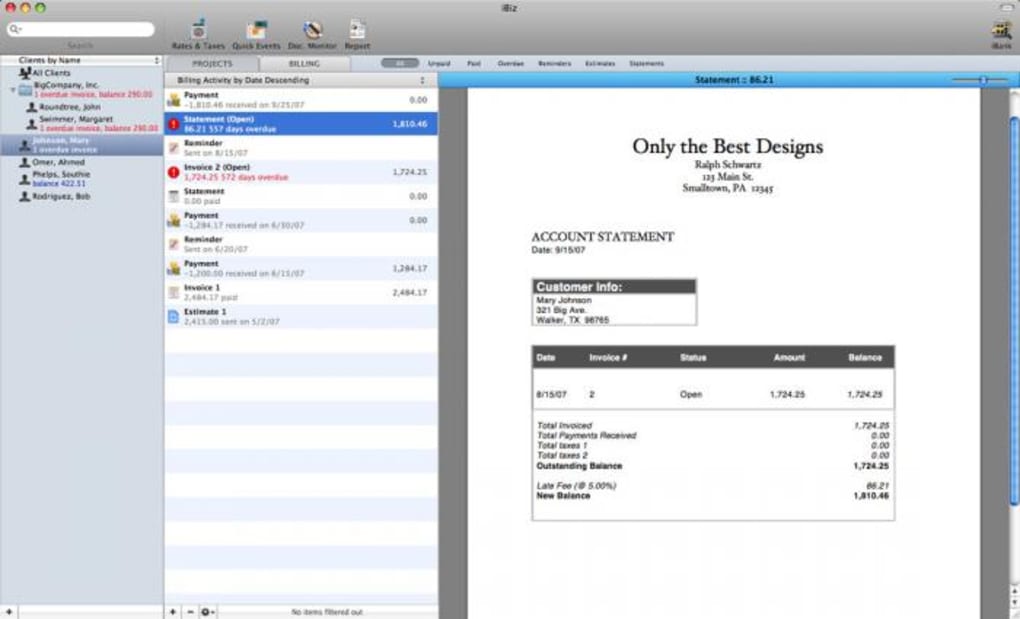
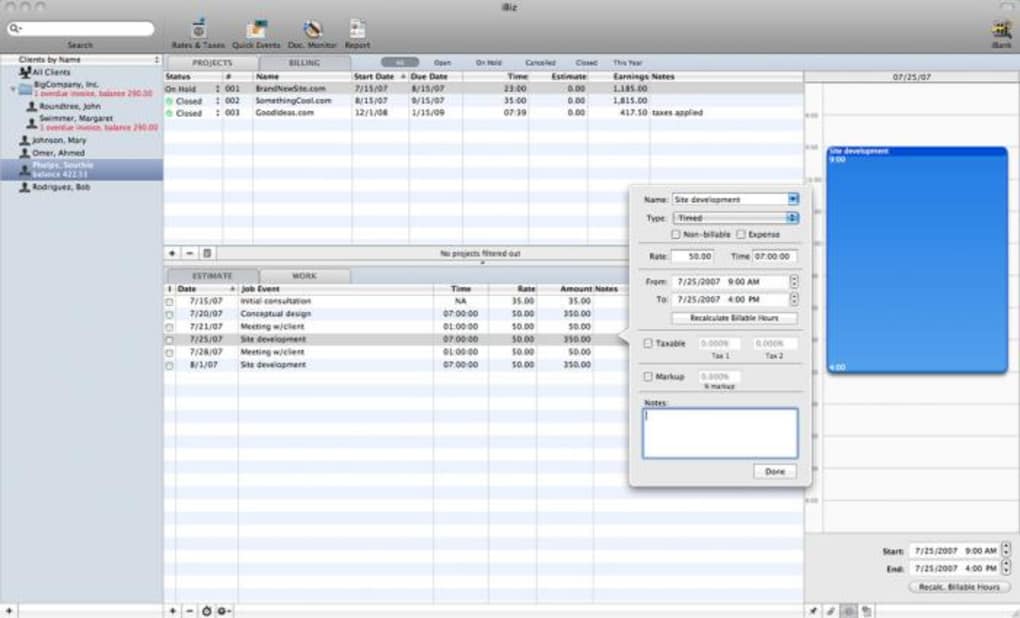
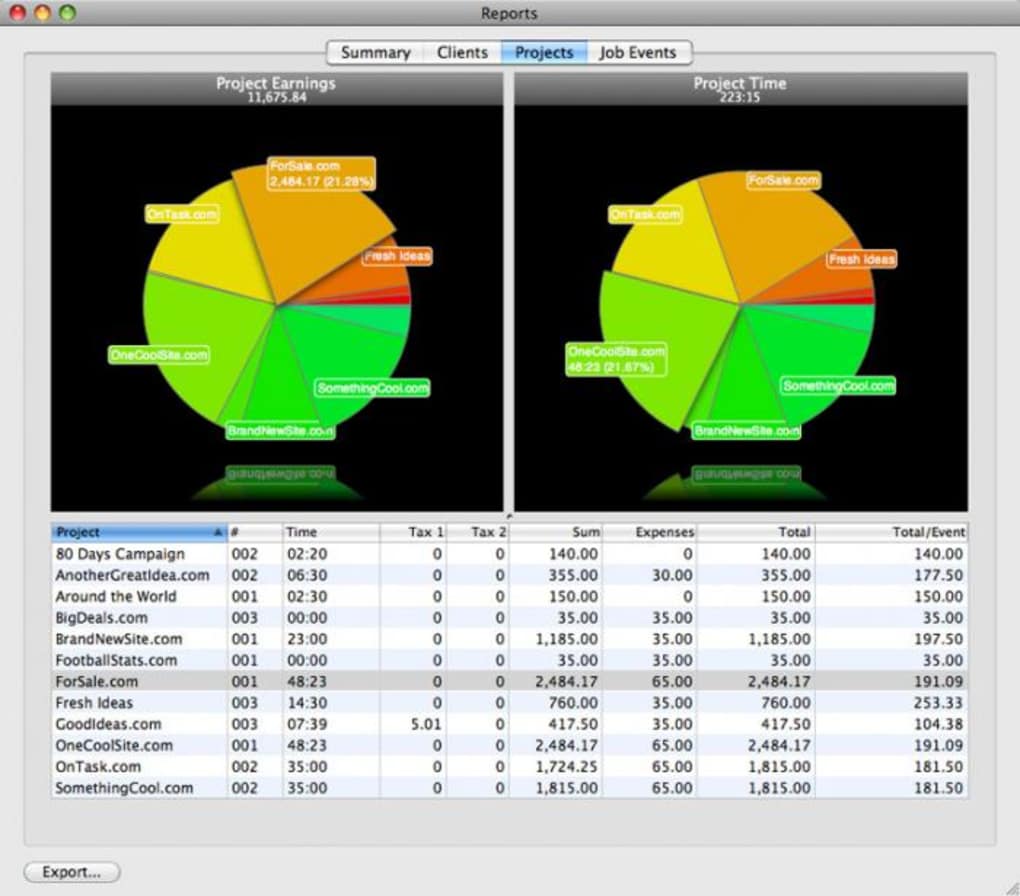
If you’re a freelancer, consultant, or small‑business owner who struggles to keep track of billable hours, expenses, and client invoices, iBiz offers a clean, Mac‑centric solution that combines time‑tracking, invoicing, and tax‑ready reporting in a single, easy‑to‑use interface. Built specifically for macOS, iBiz integrates with native apps such as iCal and Address Book, allowing you to pull calendar events and client contacts directly into your invoices without manual data entry. The software automatically saves your work as you type, reducing the risk of losing critical financial information. With customizable invoice templates, animated financial graphs, and a built‑in backup tool, iBiz transforms the tedious task of bookkeeping into a streamlined, visual experience. Whether you need to generate a quick receipt for a one‑hour consulting session or prepare a detailed quarterly tax report, iBiz provides the flexibility and reliability required for modern business operations.
Beyond the core invoicing capabilities, iBiz includes a Document Monitor Menu that tracks work progress across multiple projects, an expense‑tracking module that categorizes costs for easier tax filing, and a set of professionally designed invoice layouts that can be branded with your logo and colors. Recent updates have squashed rare bugs related to decimal handling, template exporting, and discount calculations, ensuring a stable environment for daily use. iBiz’s focus on a logical workflow—where each step from time entry to final invoice follows an intuitive sequence—means you spend less time learning the software and more time growing your business.
Core Features, Workflow & How to Get Started
Feature Overview
- Seamless integration with iCal for automatic time‑sheet population.
- Address Book sync to pull client details directly into invoices.
- Tax‑support module with built‑in calculations for common jurisdictions.
- Multiple customizable invoice templates with drag‑and‑drop design tools.
- Real‑time auto‑save to prevent data loss during invoice creation.
- Animated financial graphs for visualizing revenue, expenses, and profit margins.
- Document Monitor Menu that tracks project milestones and work hours.
- Expense tracking with categorization and receipt attachment capabilities.
- One‑click backup utility to store encrypted copies of all invoices and timesheets.
- Export options for PDF, CSV, and QuickBooks compatible files.
Step‑by‑Step Installation & First‑Time Use
Downloading and installing iBiz is straightforward. Visit the official iBiz website, click the “Download for macOS” button, and the installer (.dmg) will begin downloading automatically. Once the file is saved, double‑click to open the disk image, then drag the iBiz icon into your Applications folder. macOS may warn you about an unidentified developer; simply right‑click the app, choose “Open,” and confirm you want to run it.
Upon launching iBiz for the first time, you’ll be guided through a brief setup wizard. The wizard asks you to import contacts from Address Book, connect your iCal calendar, and set your default tax rate. You can also choose a preferred invoice template at this stage, which can later be modified or duplicated. After the initial configuration, the main dashboard appears, showing three primary tabs: Timesheets, Invoices, and Expenses.
To create a new invoice, click the “New Invoice” button, select a client from the auto‑filled list, and iBiz will pull any related calendar events as billable items. Adjust rates, add custom line items, and apply discounts if needed. The software automatically calculates tax and totals, displaying them in real time. When you’re satisfied, hit “Save & Send” to email the PDF directly to the client or export it for manual distribution. All changes are saved instantly, and a backup copy is stored in the designated backup folder, which you can locate under Preferences → Backup.
System Compatibility, Pros & Cons, and Frequently Asked Questions
Supported Operating Systems
iBiz is designed exclusively for macOS 10.13 (High Sierra) and later. It runs natively on Intel‑based Macs as well as Apple Silicon (M1, M2) devices, taking advantage of Rosetta 2 when necessary. While a Windows version is not currently offered, users can run iBiz on a Mac‑based virtual machine or via Boot Camp if they require cross‑platform access.
Pros
- Deep native integration with macOS apps (iCal, Address Book).
- Automatic save and built‑in backup reduce risk of data loss.
- Highly customizable invoice templates with branding options.
- Visual financial dashboards make performance tracking simple.
- Tax module simplifies filing for freelancers and small businesses.
Cons
- Only available for macOS; no official Windows or Linux client.
- Advanced reporting features require the paid iBiz Pro upgrade.
- Initial setup wizard may feel lengthy for users who prefer a minimalist start.
FAQ – Answers to Common iBiz Questions
Can I import existing invoices from other software?
Yes. iBiz supports CSV import, allowing you to bring in invoice data from most accounting tools. Navigate to File → Import → CSV and map the columns to the appropriate fields.
Is there a cloud sync option for iBiz?
iBiz does not include native cloud sync, but you can store the backup folder in iCloud Drive, Dropbox, or another cloud service to achieve automatic synchronization across multiple Macs.
How does iBiz handle tax calculations for multiple jurisdictions?
The tax module lets you create separate tax profiles (e.g., US Federal, EU VAT). You can assign a profile to each client, and iBiz will automatically apply the correct rate when generating invoices.
Can I customize the look of the animated financial graphs?
Yes. Under Dashboard → Settings, you can choose color schemes, chart types (line, bar, pie), and the date range displayed. These preferences are saved per user profile.
What is the difference between iBiz and iBiz Pro?
iBiz Pro adds advanced reporting, multi‑user collaboration, expanded backup storage, and the ability to expand the Connected Users drawer. It also includes priority support and regular feature updates.
Final Verdict and How to Get iBiz Today
iBiz delivers a polished, Mac‑first experience for anyone who needs to turn time into money without the hassle of juggling multiple apps. Its tight integration with iCal and Address Book, automatic saving, and tax‑ready invoicing make it a compelling choice for freelancers, consultants, and small‑business owners who value efficiency and visual insight. While the lack of a Windows version may limit cross‑platform teams, the overall stability, feature richness, and recent bug‑fixes justify the investment—especially for users who already work within the Apple ecosystem.
Ready to streamline your billing and boost productivity? USD 0.00 – download iBiz for free today, try the full feature set, and decide if the Pro upgrade is right for you. Remember, a well‑organized invoicing system not only saves time but also presents a professional image to clients—iBiz helps you achieve both.







